
Video preview
A preview or thumbnail may appear so you can confirm that the result belongs to the submitted public video.
Paste one public video URL or supported short share link to download a TikTok video when the source is available. GoodFetch prepares the available MP4 and reports watermark status only when provider data confirms it.
Public TikTok link
Resolving the public link and checking the available source formats...
TikTok video download by public link
A TikTok downloader is a browser-based tool that checks one individual public video URL and returns the available source for review and download. It is not a profile scraper, private-video bypass, or bulk account downloader.
People searching for a TikTok download video tool usually want a simple workflow: copy one post link, paste it, review the result, and save the permitted file. GoodFetch supports that process without requesting a TikTok account connection.
TikTok video download result
The exact details depend on the public source and provider response. GoodFetch does not invent quality, duration, or watermark information that was not returned.
A preview or thumbnail may appear so you can confirm that the result belongs to the submitted public video.
The current workflow prepares the available MP4 video source. Audio-only MP3 extraction is not implemented.
Duration, creator, title, or other source information may appear when the provider returns those fields.
A TikTok video download may be HD when the public source provides that variant, but GoodFetch does not guarantee HD, Full HD, 4K, or a fixed bitrate.
The result can be labeled Without watermark, Watermarked, or Status not confirmed according to the evidence returned by the provider.
GoodFetch may use a temporary file, cached response, or short-lived reference while preparing the download. It is not permanent media storage.
Download TikTok video by link
These steps also cover how to download videos on TikTok when you have one individual public post and permission to save it.
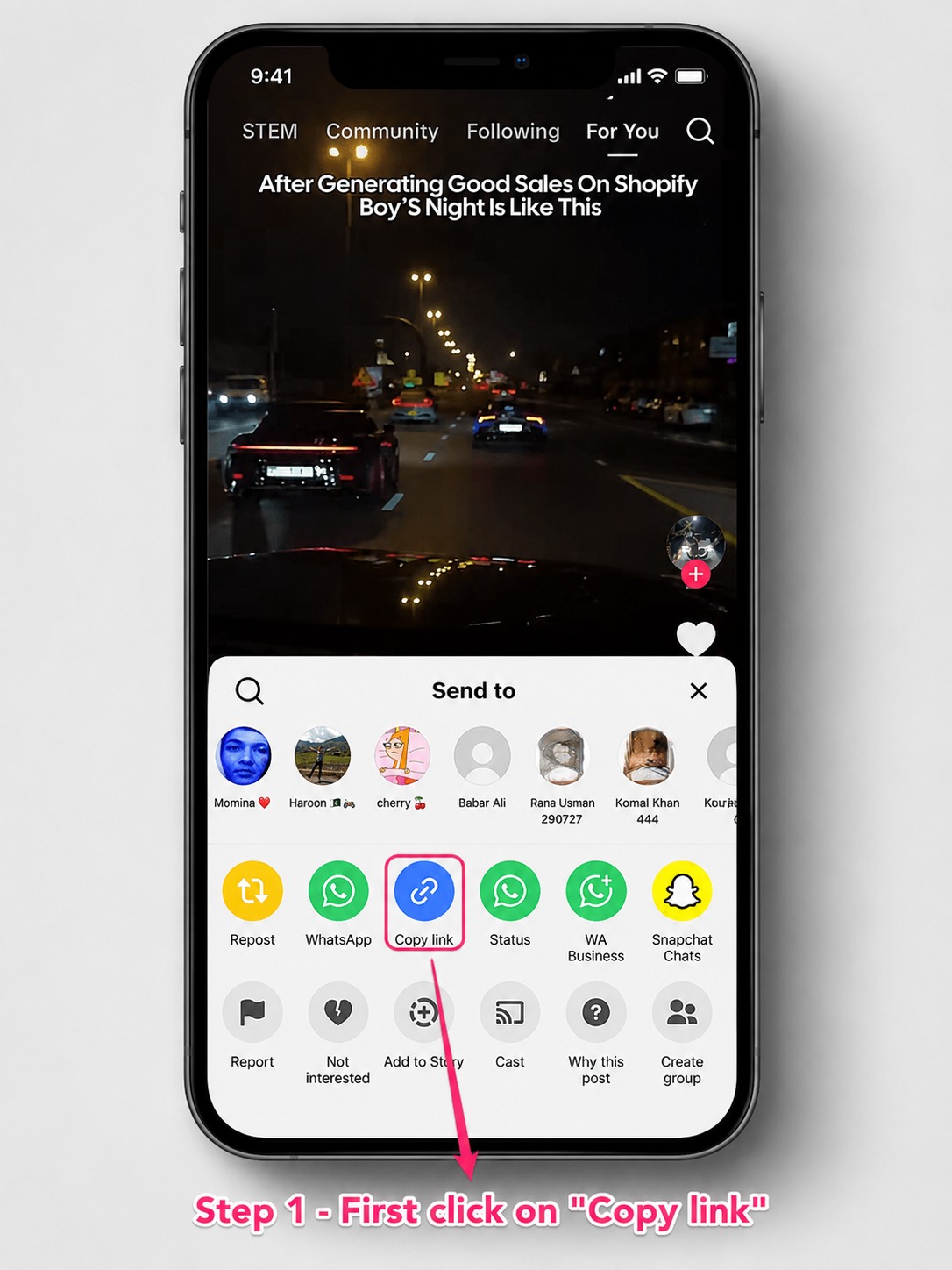
Open the individual video, use TikTok's Share control, and copy its direct URL or supported short share link.
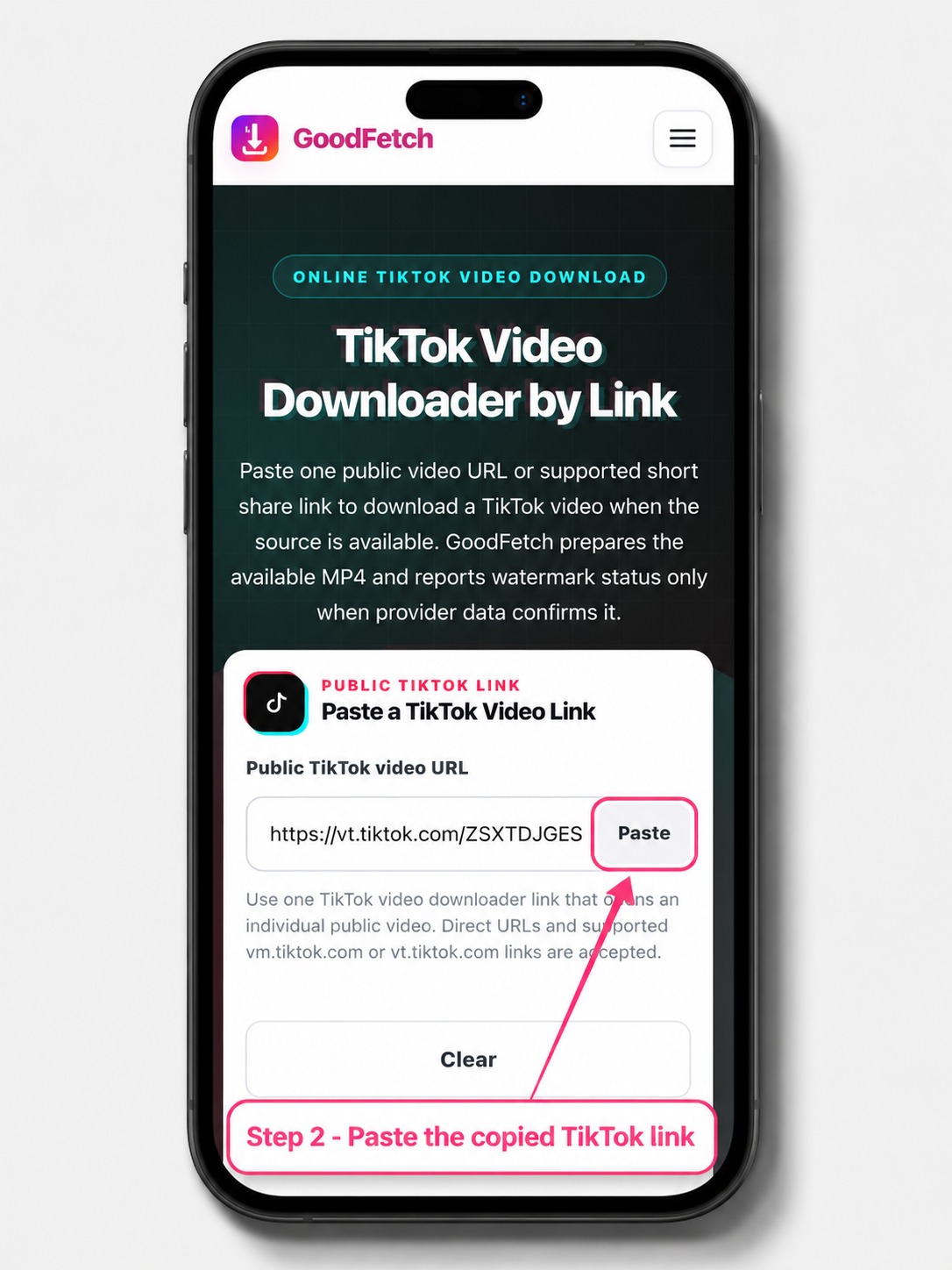
Paste the link above. GoodFetch resolves supported short links and requests the available public video source.
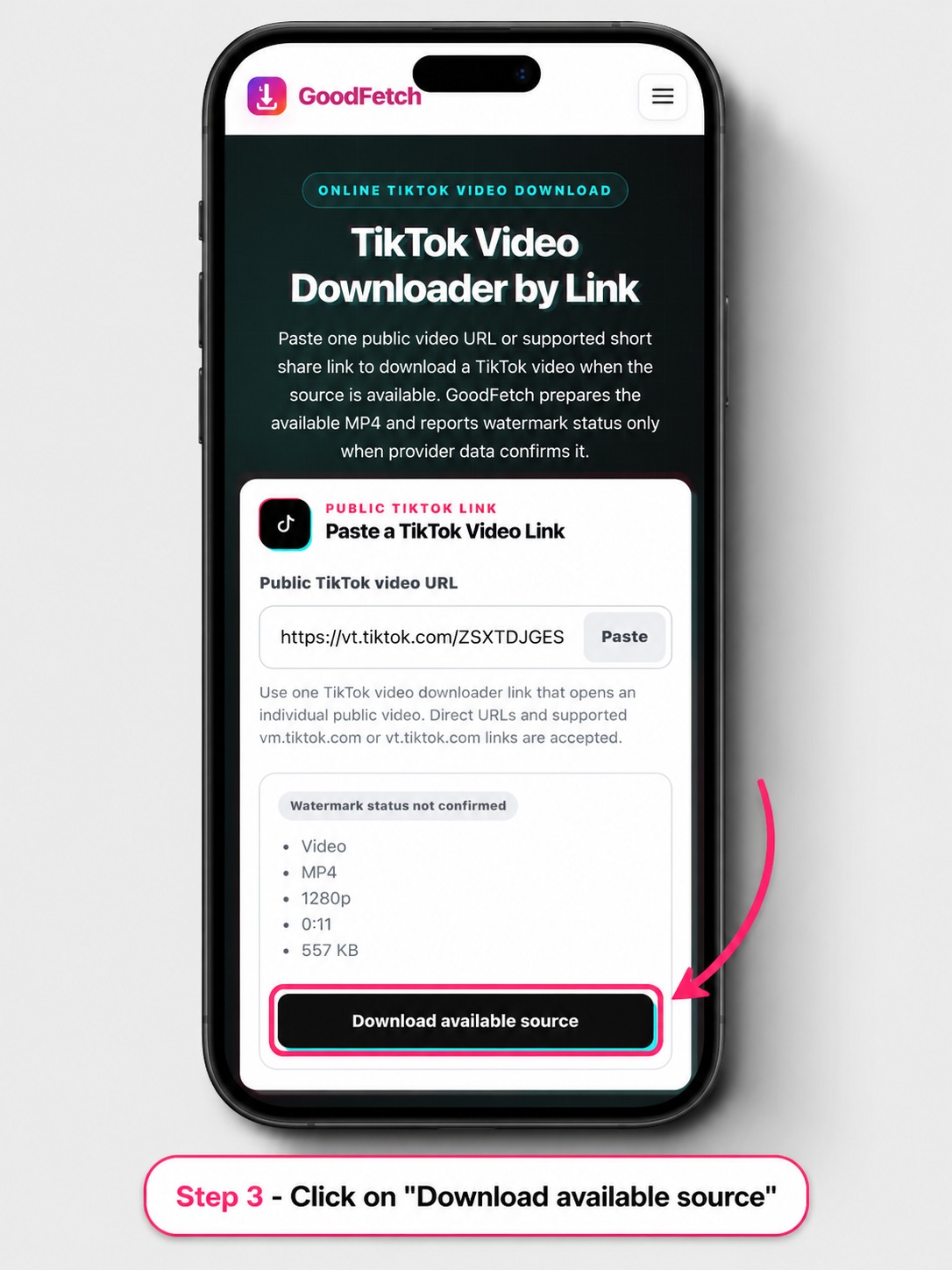
Check the preview, MP4 details, and source-status label, then use the download action for the permitted result.
Direct and short TikTok links
A valid TikTok video downloader link should open one individual publicly accessible video. GoodFetch validates supported redirect destinations before requesting the source.
Save the downloaded MP4 locally
Your browser and operating system control the final save location. GoodFetch prepares the available video but cannot move a file into Photos or Gallery without the options your device provides.
Quality and watermark status
A TikTok video download without watermark label is shown only when provider metadata explicitly identifies a clean source. GoodFetch is not a universal TikTok video downloader without watermark guarantee. Other results are labeled Watermarked or Status not confirmed.
A search for a TikTok video downloader HD result or TikTok video download HD file also describes a possible outcome, not a promise. Resolution and quality depend on the source returned for that specific public URL.
TikTok download troubleshooting
Try these checks before resubmitting the URL. GoodFetch cannot bypass TikTok privacy settings, regional restrictions, or source availability.
Use a video post URL rather than a profile, feed, search, hashtag, or Discover page.
Open the public post again, choose Share, copy the current link, and start over before resubmitting it.
Private, friends-only, age-limited, login-gated, or region-restricted videos may not be available to the public source.
A supported vm.tiktok.com or vt.tiktok.com link must resolve to an approved TikTok video destination before analysis can continue.
Wait briefly and retry once when the video still opens publicly but the provider returns no usable result.
Analyze the original URL again when a temporary download token or prepared file has expired.
Privacy and temporary processing
GoodFetch processes the public URL to identify the available video source and download options. The link may be transmitted to technical providers required to complete the request.
Some operations may use temporary files, cached responses, or short-lived references. GoodFetch is not designed as permanent cloud storage or a searchable TikTok video archive.
Limited technical logs may be retained for security, reliability, abuse prevention, and troubleshooting. GoodFetch does not request a TikTok password, authentication token, private cookie, or connected account.
Review the complete Privacy Policy for details about analytics, infrastructure providers, temporary processing, and retention.
TikTok Video Downloader FAQ
Review link support, mobile saving, MP4 quality, watermark labels, privacy, and common availability limits.
Copy the direct public video URL or a supported short share link, paste it into GoodFetch, analyze the source, review the available MP4, and use the download action for content you are permitted to save.
GoodFetch supports one individual public TikTok video URL and supported vm.tiktok.com or vt.tiktok.com share links that resolve to an approved public video destination.
No. GoodFetch does not request TikTok credentials, private cookies, authentication tokens, or a connected account.
No. Private, friends-only, login-protected, age-limited, region-restricted, or otherwise inaccessible videos are not supported.
Your browser saves the MP4 in its configured Downloads location or asks you to choose a folder. On phones, open the downloaded file and use the device's Share or Move options when you want it in Photos or Gallery.
Yes. TikTok Save Video is an in-app option controlled by TikTok and the creator's settings. GoodFetch is a browser workflow for supported public links and does not change the creator's account settings.
The current workflow prepares the available MP4 source. It does not offer audio-only MP3 extraction or guarantee a particular codec, resolution, or bitrate.
An HD result may be available when the public source provides one, but GoodFetch does not guarantee HD, Full HD, 4K, original-upload quality, or a fixed bitrate for every video.
GoodFetch labels a result Without watermark only when provider metadata explicitly confirms a clean source. Other results are labeled Watermarked or Status not confirmed, so a clean version cannot be promised for every URL.
It means an available video source was returned, but the provider did not supply reliable evidence confirming whether that source is clean or watermarked.
The post may be removed, private, age-limited, region-restricted, temporarily unavailable, blocked behind login, or unsupported by the configured public source.
No. GoodFetch is not intended as permanent media storage. Processing may use temporary files, cached responses, short-lived references, and limited technical logs for operational and security purposes.
No. Bulk profile downloads are not supported. Submit one supported public video link per request.
Related GoodFetch tools
Use a dedicated Instagram downloader when the submitted public link belongs to a Reel, photo, or carousel rather than TikTok.
Download only videos you created, are licensed to use, or have clear permission to save. Do not remove required attribution or republish another creator's work without authorization. Review the Copyright Policy and Terms of Use.
Content reviewed: July 25, 2026 by the GoodFetch Team.