
Reel title and creator
GoodFetch may display the public title and creator name returned with the Reel. These labels help you confirm that the correct link was analyzed.
Paste one direct public Reel URL to analyze the media and save the available MP4 when you own it or have permission to download it.
Public Instagram Reel link
Checking the public link and available video formats...
Built for short-form video
An Instagram Reel downloader is an online tool that takes the direct URL of one public Reel and checks whether the source can return a usable video.
GoodFetch keeps Reels separate from photos and carousels so you can download Reels from Instagram by link and use the available MP4 download option returned for that media.
Understand the result
The details depend on what the public source and extraction provider return for that specific Reel. A result may contain fewer fields when some information is unavailable.
GoodFetch may display the public title and creator name returned with the Reel. These labels help you confirm that the correct link was analyzed.
The result identifies the available video format. MP4 is a widely supported video container that normally opens in modern browsers and media players.
DASH is a source-delivery label used for adaptive streaming. GoodFetch may show it beside MP4 when that is the format description returned for the available video.
Use the download button shown for the result. The button text reflects the available format returned for that Reel and may vary between links.
The form is designed for one direct public Reel URL at a time. Submit a separate request for each additional Reel you are permitted to save.
Some requests use a short-lived download reference to complete the operation. GoodFetch is not designed as permanent cloud storage or a searchable media archive.
How to download Instagram Reels
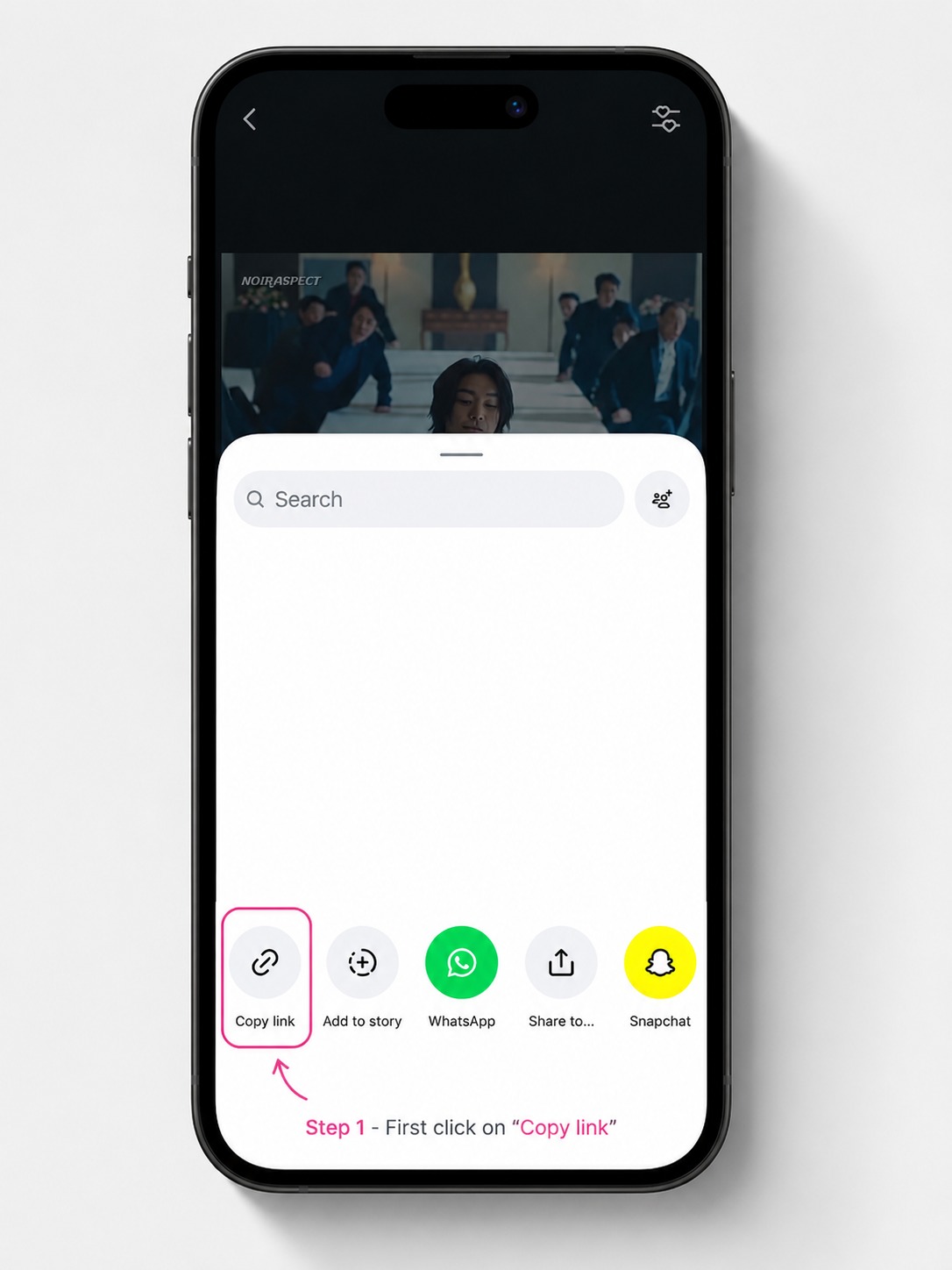
Open the public Reel, use its share control, and copy the direct Reel URL.
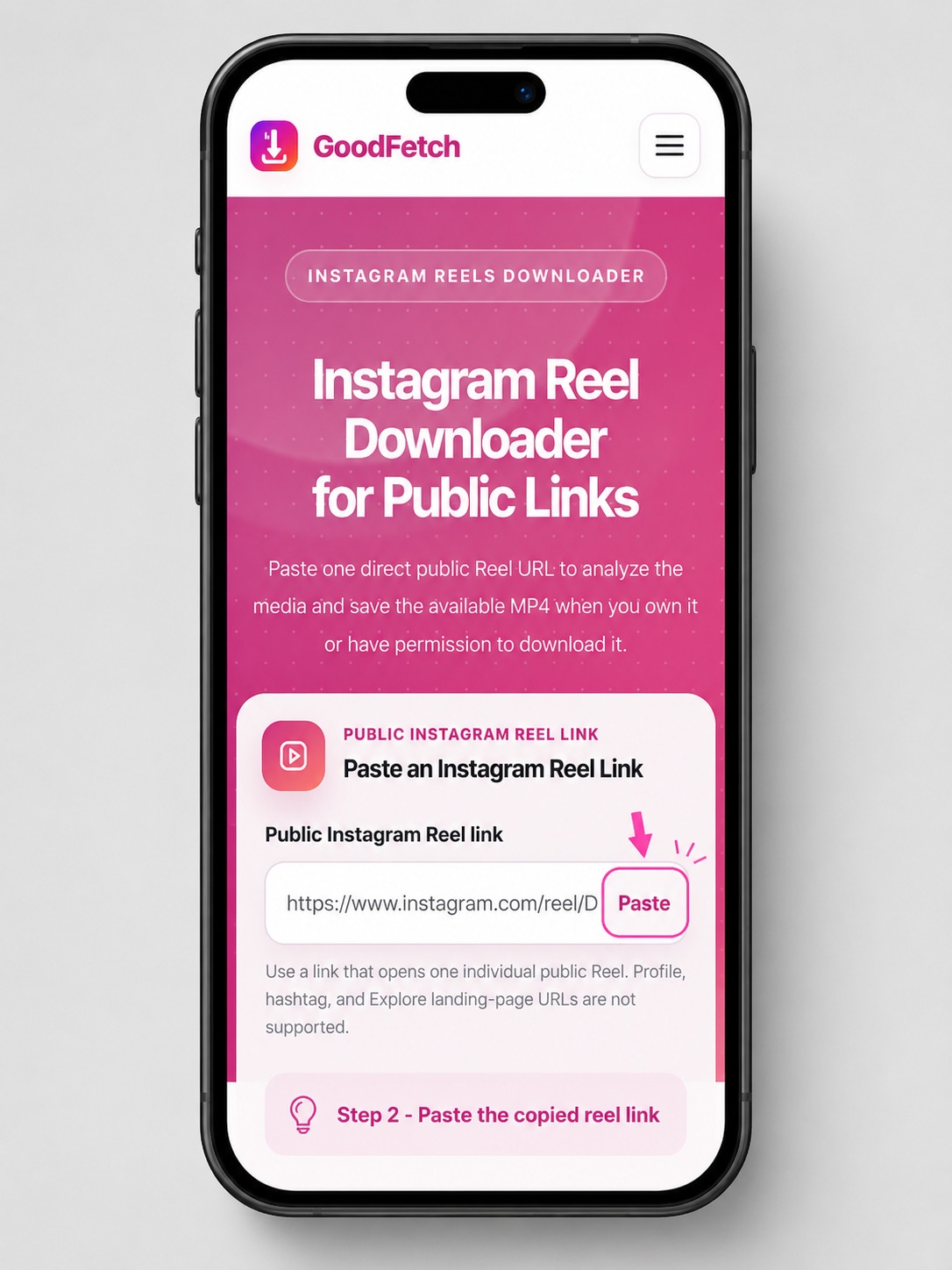
Paste the copied link into the GoodFetch Instagram Reels downloader and start the public-source check.
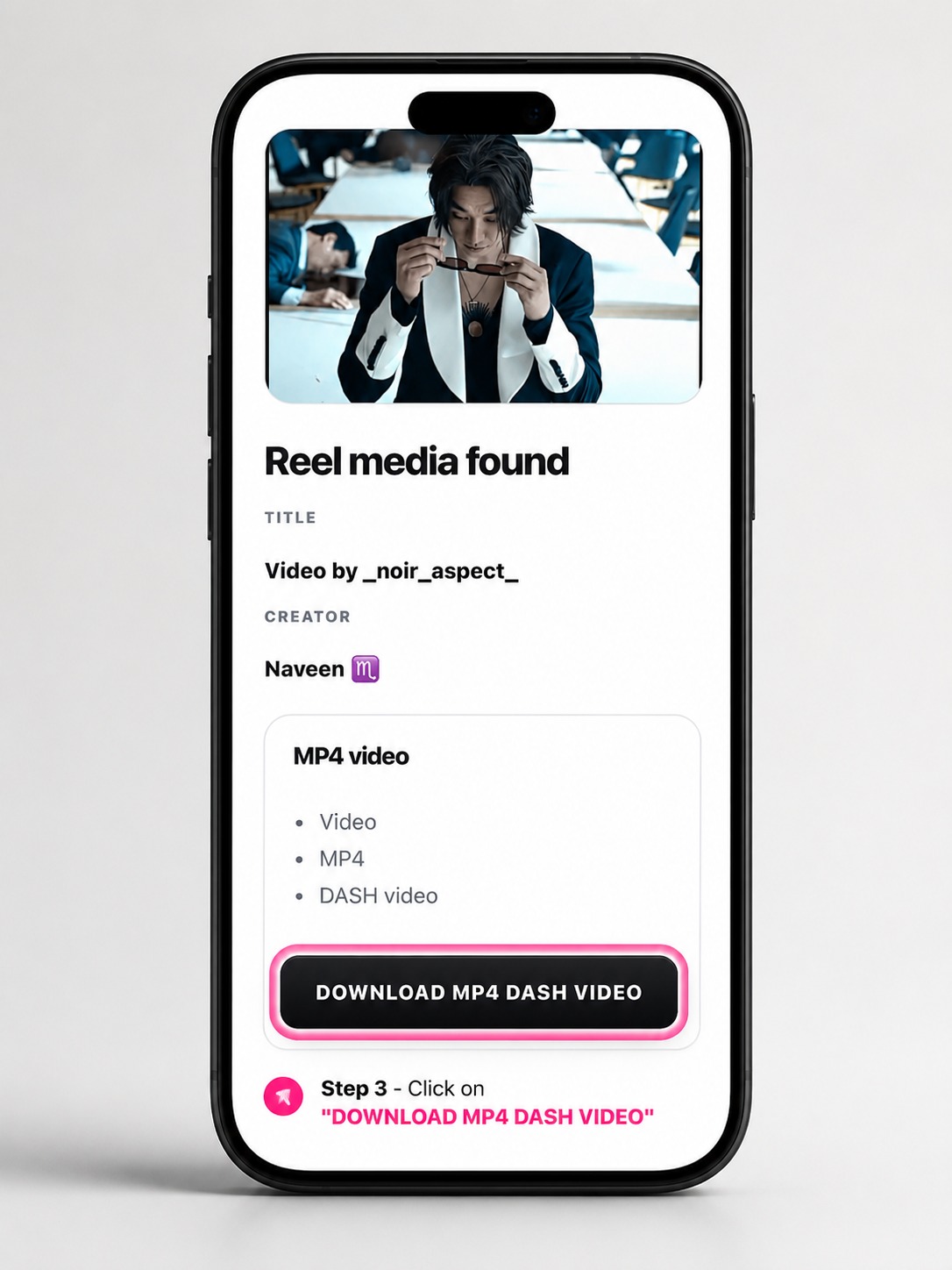
Check the returned media details, then use the available MP4 download button if you are allowed to save the Reel.
Instagram Reels video downloader features
Check one public short-form video and its available MP4 details before downloading.
Use this Reels toolPreview a public single-image post and its returned dimensions and format.
Open Photo DownloaderList available images and videos from one public multi-item post.
Open Carousel DownloaderWhat GoodFetch offers
No credentials, cookies, or account connection are requested.
Private and login-protected videos remain outside the supported scope.
Use this online Reel downloader without installing an app or browser extension.
When media is found, the result shows the available video format and its download button.
The form and result panels adapt to narrow touch screens.
Move between Reels, photos, and carousels through dedicated tools.
Supported and unsupported links
GoodFetch works with an individual public Reel link, but public visibility alone does not guarantee that the provider can return a downloadable result.
The current provider may also fail to expose a usable video for an otherwise valid public link. GoodFetch does not bypass access controls or invent a download result.
Save Instagram Reels on any device
Your browser controls the save location. On phones, the MP4 may appear in Downloads or Files before you move or save it to Photos or Gallery.
Permitted use cases
The right to view a public Reel is not automatically the right to reuse it. These examples assume that you own the media or have clear permission from the rights holder.
Keep a local copy of a Reel you created and posted so it can remain part of your personal content archive or production records.
Save a Reel supplied by a client or creator when your agreement allows local storage, editing, review, or campaign delivery.
Transfer an authorized Reel to another phone or computer before continuing an editing, captioning, or publishing workflow.
Keep an authorized reference available for a presentation, class, moderation task, or internal review when an internet connection may not be available.
Practical checks
Copy its /reel/ or /reels/ address instead of a profile or feed URL.
Try the link while signed out; access-gated media is not supported.
Copy the share link again, choose Start over, and resubmit it.
Privacy and processing summary
GoodFetch processes the URL to identify the available media result and download option. The public link may be transmitted to technical providers required to complete that request.
Some operations may use temporary files, cached responses, or short-lived download references. GoodFetch is not intended to work as permanent cloud storage or a searchable archive of submitted links.
Technical logs may be retained for a limited period for security, reliability, abuse prevention, and troubleshooting. GoodFetch does not require your Instagram password, login code, authentication token, or private session cookie.
Review the complete Privacy Policy for analytics, cookies, infrastructure providers, temporary processing, and retention details.
Instagram Reels FAQ
Use any copied link that opens one individual public Reel, typically containing /reel/ or /reels/. Profile, hashtag, and Explore landing-page URLs are not supported.
Copy the direct public Reel URL, paste it into GoodFetch, start the analysis, and review the available MP4 before downloading media you are allowed to save.
Your browser normally saves the MP4 in Downloads or Files. On supported phones, open the downloaded file and use the device share or save control to place it in Photos or Gallery.
When the available source MP4 includes audio, that audio stays with the downloaded video. GoodFetch does not extract a separate music file or add audio that is missing from the source.
When media is found, GoodFetch can show the Reel title, creator, available video format, and the download button returned for that result.
No. GoodFetch does not request Instagram credentials, cookies, or account access.
No. Private, login-protected, restricted, and otherwise inaccessible Reels are not supported.
The Reel result uses the available video format returned by the extraction provider and provides the corresponding download option.
Your browser normally saves the file in its configured Downloads location or asks you to choose a folder.
A public-looking Reel may have been removed, region-restricted, temporarily unavailable, or unsupported by the current provider.
MP4 identifies the video container, while DASH describes an adaptive streaming delivery method used by some sources. GoodFetch displays the format description returned for that Reel and provides the related download button.
GoodFetch is not designed as permanent media storage. Some requests may use temporary files, cached responses, or short-lived download references, while technical logs may be retained for limited operational, security, and legal purposes.
Related tools
Download Reels only when you own the media or have permission to save and use it. Public visibility does not remove copyright or other rights. Read the Copyright Policy and Terms of Use.
Content reviewed: July 24, 2026 by the GoodFetch Team.