
Numbered carousel items
Each returned photo or video appears as a separate numbered item so you can review the collection one entry at a time.
Paste one public multi-item post link to list the available photos and videos, then download each permitted carousel item separately.
Public multi-item post
Checking the public post and collecting its available media entries...
One post with multiple slides
An Instagram carousel downloader checks one public multi-item post and lists the photos and videos returned for that link. It is designed for carousel post downloads, not profiles, Stories, or several unrelated post URLs.
GoodFetch numbers the available items in the sequence supplied by the extraction provider and gives each result its own download control. To download Instagram carousel pictures, review each numbered image card; video slides can appear in the same result when available.
Understand the returned collection
The result depends on the public source and extraction provider. GoodFetch does not invent missing slides, create substitute files, or promise that every post will return the same fields.
Each returned photo or video appears as a separate numbered item so you can review the collection one entry at a time.
GoodFetch uses the available media metadata to distinguish image slides from video slides when the provider returns that information.
Cards follow the sequence supplied by the provider. If a slide is omitted upstream, the displayed numbering reflects the returned result rather than a guessed position.
Each available item has its own action. A ZIP file or one-click Download All feature is not implemented on this page.
Preview, format, dimensions, duration, or source status may appear when those details are returned for a specific item.
Requests can use temporary files, cached responses, or short-lived download references. GoodFetch is not permanent storage for carousel media.
Instagram carousel post download
Use one direct public multi-item post URL and download only the photos or videos you own or have permission to save.
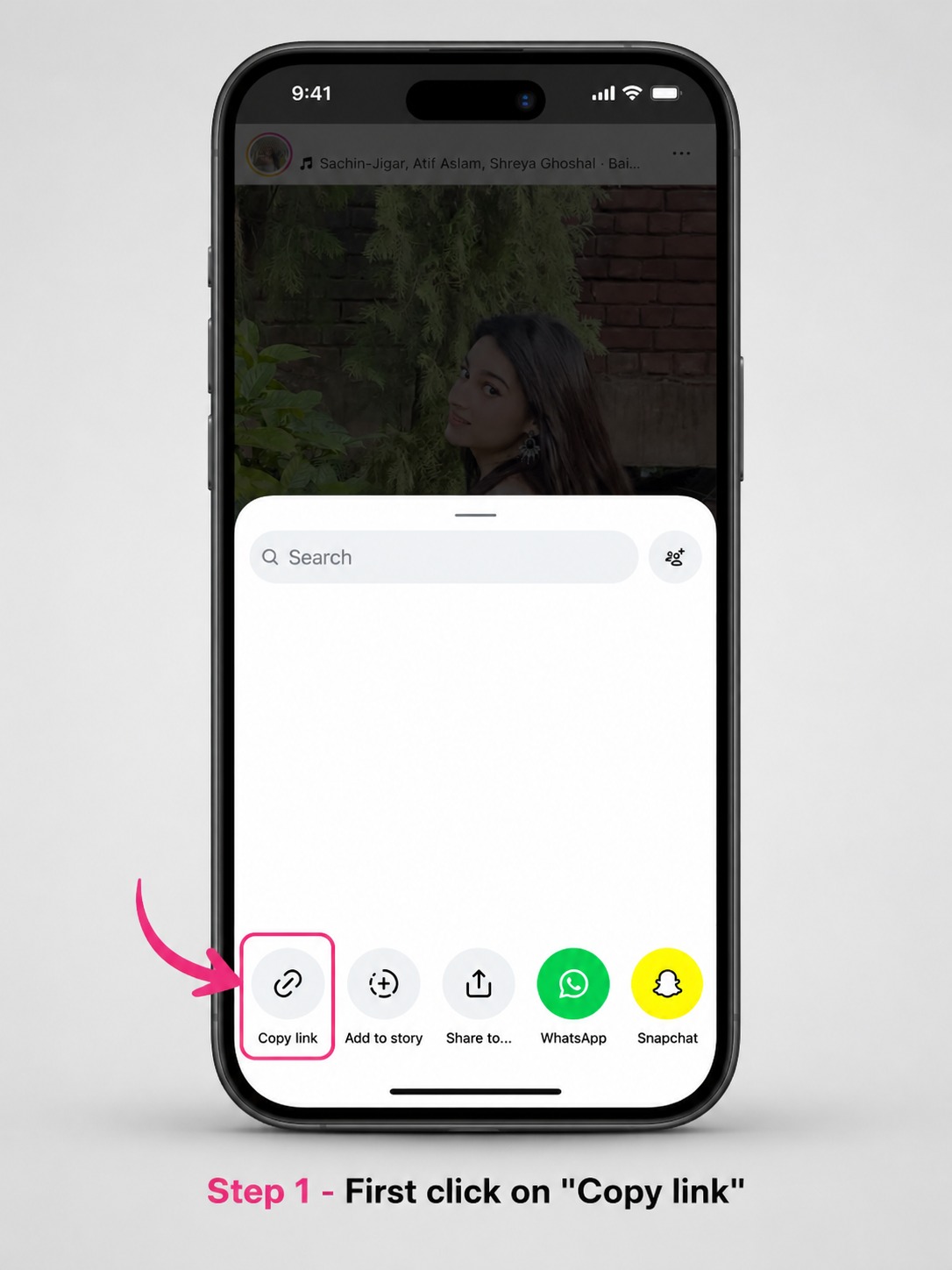
Open the public Instagram post, confirm that it contains multiple slides, and copy its direct share link.
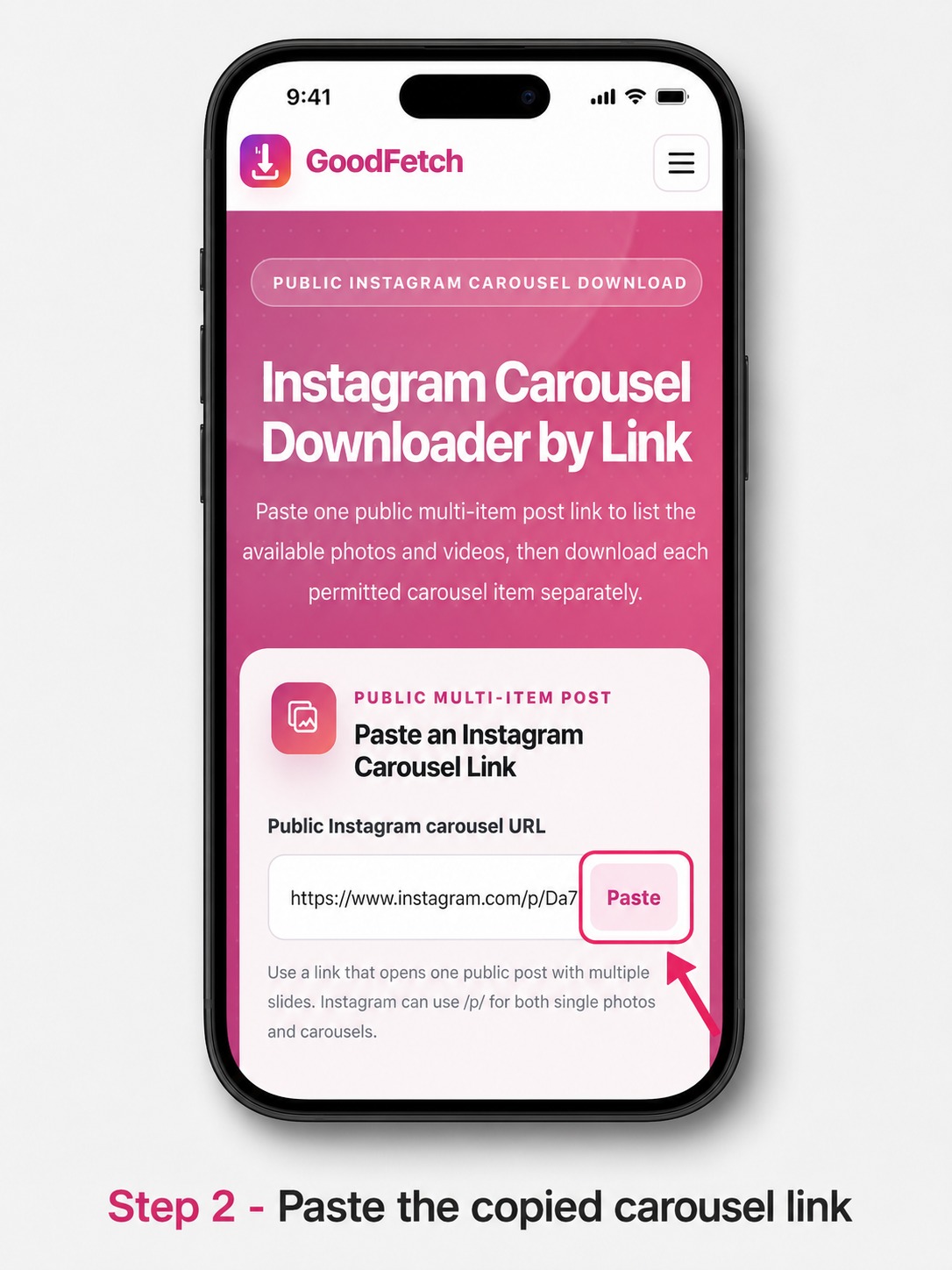
Paste the copied URL into GoodFetch and start the public carousel check.
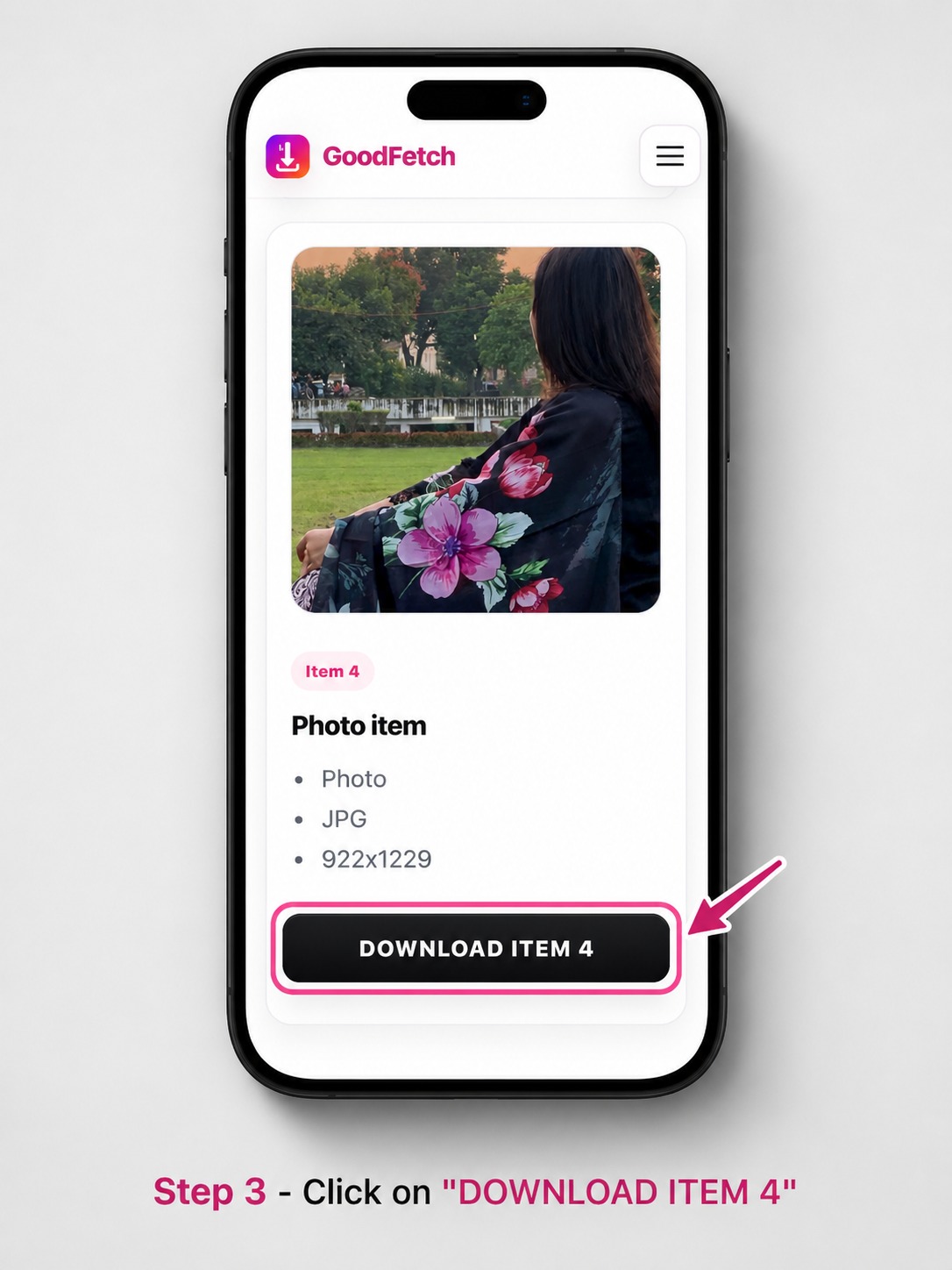
Check the numbered photo and video results, then use the individual download button for every permitted item you want to save.
Choose by Instagram post type
Instagram can use a similar post URL pattern for a single photo and a carousel. Open the post first and choose the tool that matches what it displays.
Use this page when one public post contains several photos, videos, or both.
Use this Carousel DownloaderUse the Photo page when the public post contains one image with no additional slides.
Open Photo DownloaderUse the Reels page when the link opens one public short-form video.
Open Reels DownloaderPublic carousel download features
GoodFetch works through a browser and processes one supported public carousel post per request. It does not ask you to connect an Instagram account.
No username, password, private cookie, or authenticated Instagram session is requested.
The post must open publicly without a sign-in, private-account permission, or another access restriction.
Use the carousel downloader without installing an app, APK, extension, or desktop program.
A returned collection can include photos, videos, or a mixture of both post-item types.
Carousel result cards adapt to phones, tablets, laptops, and desktop browsers.
GoodFetch displays what the provider returns and does not claim a missing slide, ZIP file, or unsupported Download All action is available.
Collection boundaries
GoodFetch does not guess how many slides exist. A photo or video may be unavailable, restricted, unsupported, oversized, removed, or omitted by the source. The displayed count reflects the returned collection, not a substitute result created by GoodFetch.
Each available item must be downloaded separately because ZIP creation and a functional Download All feature are not implemented.
Check the submitted Instagram URL
Use a link that opens one public multi-item post. A correct-looking URL can still fail when the post or one of its slides is no longer available to the public source.
Save carousel items across devices
Every returned carousel item has a separate download action. Your browser and operating system decide the final save location.
Instagram carousel download checks
Try these checks before submitting the URL again. GoodFetch does not bypass Instagram access controls or recreate slides that the provider cannot return.
If the post contains only one image, use the Instagram Photo Downloader instead.
Submit one individual post link rather than a profile, feed, Explore, or hashtag page.
Test whether the post opens while signed out. Private and login-protected carousels are not supported.
Open the post again, copy its current share URL, choose Start over, and resubmit it.
A partial collection can mean that one or more items were removed, restricted, unsupported, or omitted by the source.
Wait briefly and retry once when the public post still opens but no result is returned.
Privacy and processing summary
GoodFetch processes the public URL to identify the available carousel entries and download options. The link may be transmitted to technical providers required to complete the request.
Some operations may use temporary files, cached responses, or short-lived references. GoodFetch is not intended to function as permanent cloud storage or a searchable archive of Instagram carousel media.
Technical logs may be retained for a limited period for security, reliability, abuse prevention, and troubleshooting. GoodFetch does not require an Instagram password, authentication token, private cookie, or connected account.
Review the complete Privacy Policy for analytics, infrastructure providers, temporary processing, and retention details.
Instagram Carousel FAQ
Review supported post types, item order, ZIP limitations, device saving, quality, and privacy.
An Instagram carousel is one post containing multiple swipeable photos, videos, or a mixture of both. Its public URL can use the same /p/ pattern as a single-photo post.
Copy the direct public multi-item post URL, paste it into GoodFetch, analyze the post, review the numbered results, and download each permitted item separately.
Yes. GoodFetch labels each available item using the photo or video metadata returned by the source.
The interface numbers items in the sequence supplied by the extraction provider. GoodFetch does not rearrange them, but an unavailable slide may be omitted upstream.
No. ZIP creation and a functional Download All feature are not implemented, so each available carousel item must be downloaded separately.
A slide may be removed, unavailable, restricted, unsupported, oversized, or omitted by the source. GoodFetch does not create substitute carousel items.
No. GoodFetch supports only publicly accessible posts and does not authenticate or bypass private account settings.
Use the Instagram Photo Downloader when the public post contains one image and no additional slides.
Your browser normally saves each file in its configured Downloads location or asks you to choose a folder. Phones may first show files in Downloads or Files before Photos or Gallery.
GoodFetch provides the media made available by the source for each result. It does not guarantee the original upload, a specific resolution, HD, 4K, or identical quality for every item.
No. GoodFetch does not bulk-download a profile or process every post from an account. Submit one supported public carousel post link at a time.
GoodFetch is not designed as permanent media storage. Some requests may use temporary files, cached responses, or short-lived references, while limited technical logs may be retained for operational, security, and legal purposes.
Related GoodFetch tools
Use a dedicated downloader when the Instagram post contains one photo or one Reel, or when the public link belongs to TikTok.
A carousel can combine media with different creators, licenses, or permissions. Download only items you created, are licensed to use, or have clear authorization to save. Review the Copyright Policy and Terms of Use.
Content reviewed: July 25, 2026 by the GoodFetch Team.