
Download TikTok Video by Link on iPhone
Use a public TikTok video link that opens one individual post. GoodFetch accepts supported full URLs and supported short share links that resolve to an approved public video destination. Profile, feed, private, friends-only, login-protected, removed, and inaccessible posts do not fit this workflow.
The result can include a preview, MP4 format, available quality details, and provider-reported watermark status. GoodFetch does not request TikTok credentials or connect to a private account.
Download TikTok Videos on iPhone Without App
This is a browser workflow, so you do not need to install a separate downloader app or APK. Open GoodFetch in Safari, paste the public link, review the result, and save the available MP4 through the browser.
- Use one individual public TikTok video link.
- Confirm that the post opens without signing in.
- Keep enough iPhone storage for the MP4.
- Download only videos you created, are licensed to use, or have permission to save.
How to Download TikTok Videos on iPhone
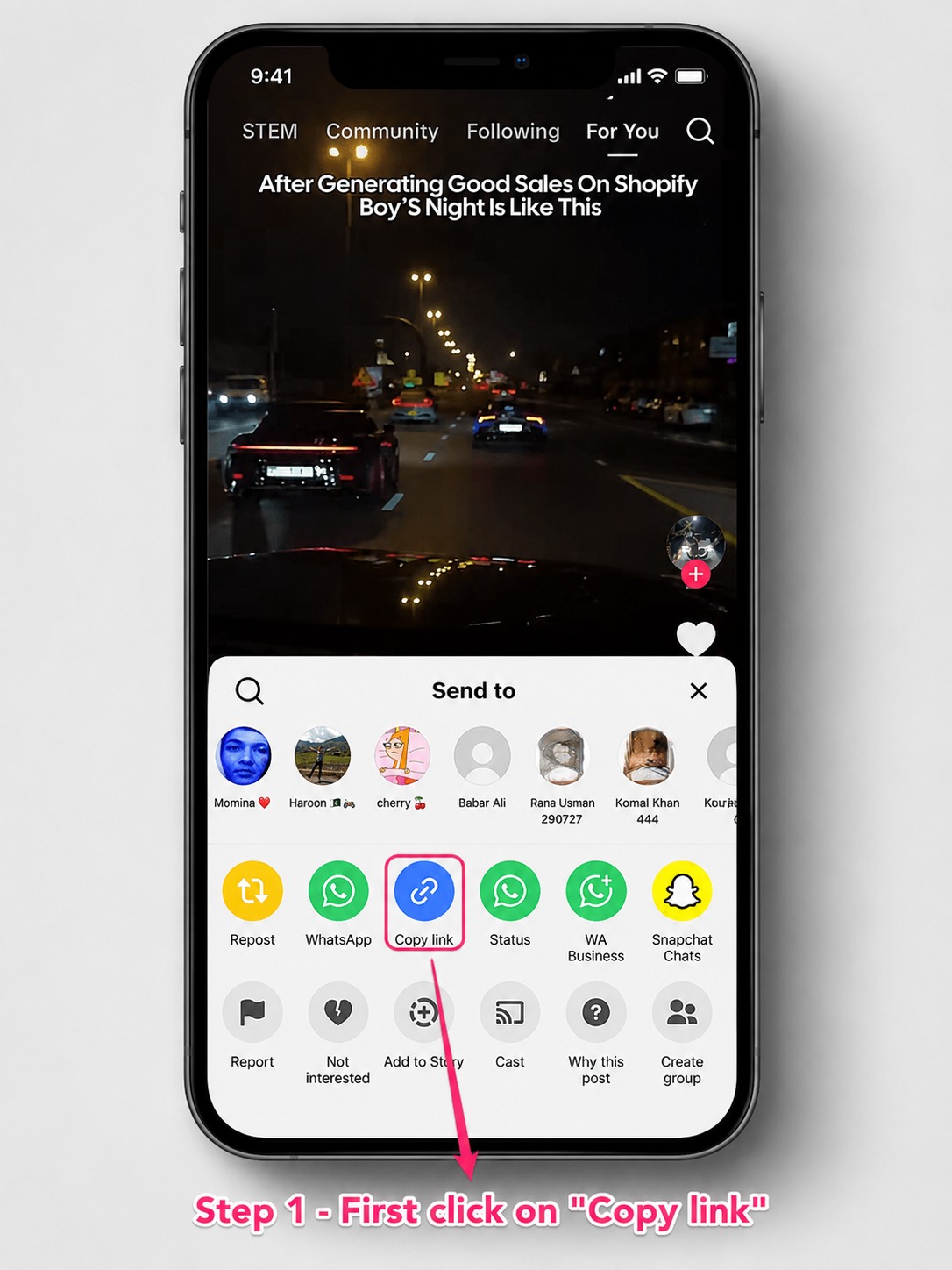
Copy the public TikTok video link
Open the individual video in TikTok. Tap Share and choose Copy link. A supported vm.tiktok.com or vt.tiktok.com URL can resolve to the full public video destination.
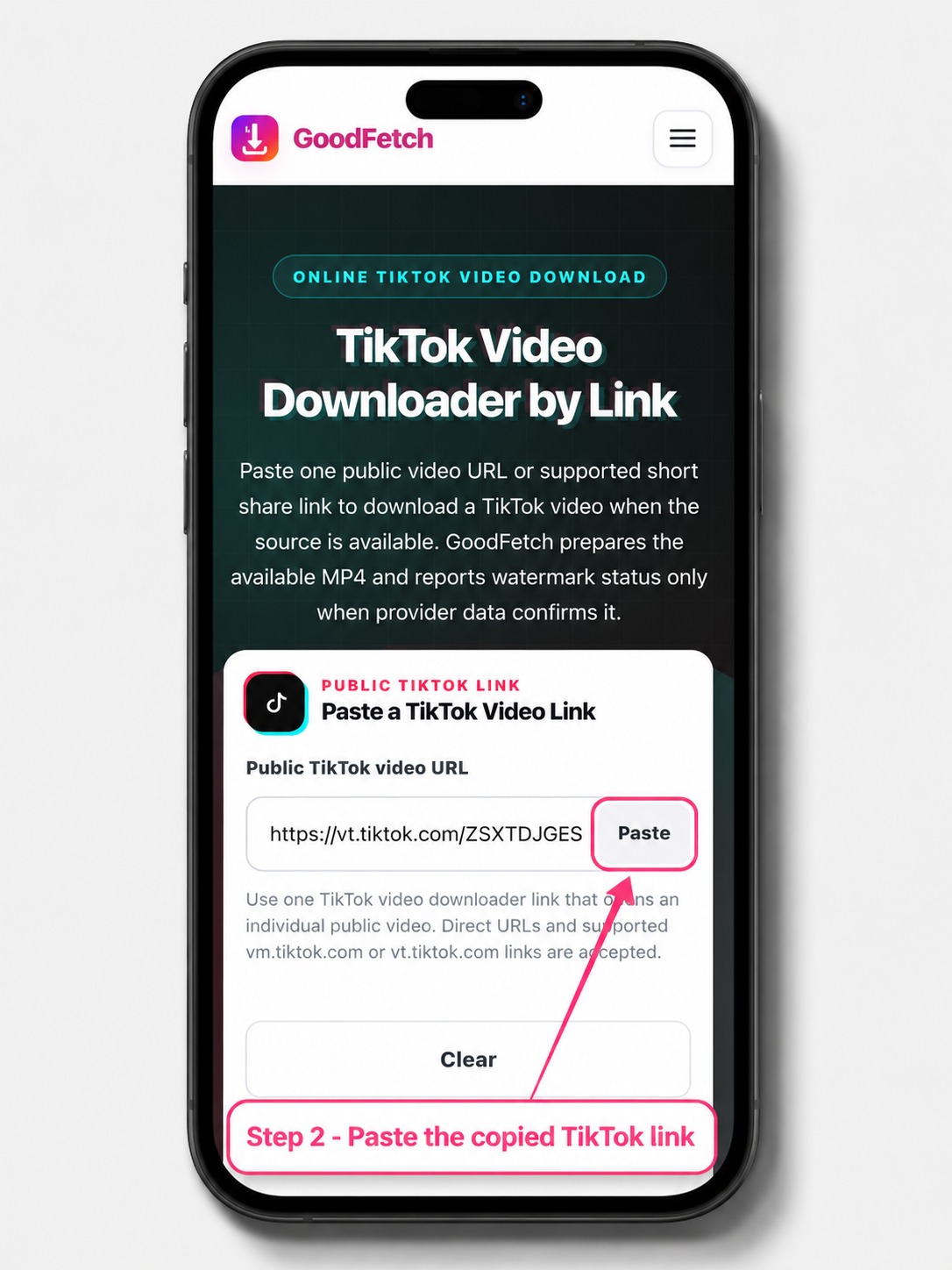
Paste the link into GoodFetch
Open the TikTok Video Downloader in Safari, paste the copied URL, and start the public-source check. Supported short links are validated before the available video is requested.
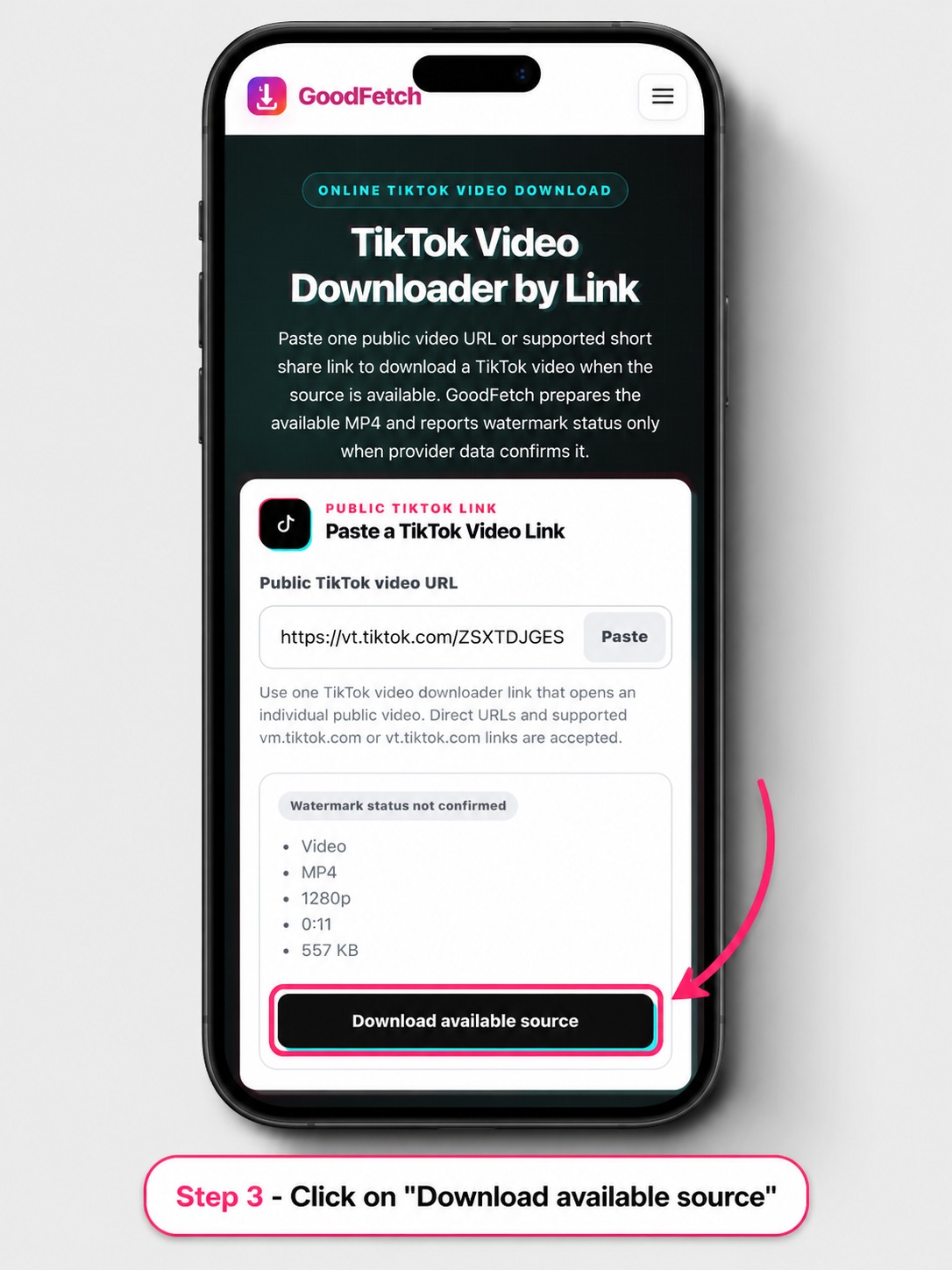
Review and download the available MP4
Check the preview, format, available MP4 quality, and watermark-status label. Use the download action only when you are authorized to save the video.
Where Do TikTok Downloads Go on iPhone?
Safari normally places completed internet downloads in its Downloads folder. Tap Safari's Downloads button when it appears, or open Files, tap Browse, and check Downloads under iCloud Drive or On My iPhone.
If you cannot find the video, use the Files search field and check the Safari download location selected in iPhone Settings. The file must finish downloading before it can be opened or moved.
How to Save TikTok Videos to Camera Roll
The browser download and Photos are separate locations. Open the MP4 in Files, tap Share, and choose Save Video when iOS provides that option. Then open Photos and check Recents or the Videos media type.
How to Save Videos from TikTok to Gallery
On an iPhone, the equivalent destination is the Photos library rather than an Android Gallery app. Complete the Safari download first, then use the Files share sheet to save the supported MP4 to Photos.
TikTok's Native Save Video Option
TikTok Save Video Option Missing - Why It Happens
TikTok may not show its native Save Video action when the creator does not allow downloads or the post is not eligible. GoodFetch is a separate public-link workflow and does not change creator settings or bypass platform access controls.
TikTok Download Troubleshooting on iPhone
TikTok Video Download Not Working on iPhone
Confirm that the submitted URL opens one public video rather than a profile or feed. Copy a fresh Share link, allow a supported short link to resolve, check available iPhone storage, and retry after a temporary provider or network failure.
The MP4 is not showing in Photos
Check Files or Safari Downloads first. After the file finishes downloading, open it and use Share, then Save Video when iOS offers that action.
The temporary result expired
Analyze the original public TikTok URL again and use the new download reference.
TikTok Watermark Status and Video Quality
How to Download TikTok Videos Without Watermark on iPhone
GoodFetch labels a source Without watermark only when provider metadata explicitly confirms a clean result. Other videos can be labeled Watermarked or Status not confirmed. A no-watermark version cannot be guaranteed for every public URL.
Download TikTok Video HD iPhone Quality: What to Expect
The available MP4 may have useful quality, but GoodFetch does not guarantee HD, Full HD, 4K, the original upload, or a fixed bitrate. The returned format and resolution depend on the public source and provider response.
Privacy and Responsible Use
GoodFetch processes the public URL to prepare the available result and may use temporary files, cached responses, or short-lived references. It is not permanent video storage and does not request a TikTok password or private cookie. Review the Privacy Policy, Copyright Policy, and Terms of Use.
Frequently Asked Questions
How do I download a TikTok video on iPhone with GoodFetch?
Copy one public TikTok video link, paste it into GoodFetch, review the available MP4, and use the download action. Safari normally stores the file in Downloads or the Files app.
Where do TikTok downloads go on iPhone?
Open the Files app, tap Browse, and check Downloads under iCloud Drive or On My iPhone. Safari can also show a Downloads button next to the address field after a completed download.
How do I save the downloaded TikTok video to Photos?
Open the MP4 in Files, tap Share, and choose Save Video when iOS provides that option. The browser download and the Photos library are separate locations.
Why is the TikTok Save Video option missing?
TikTok may not show its native Save Video action when the creator does not allow downloads or the post is not eligible. GoodFetch does not change creator settings or bypass access restrictions.
How to download TikTok videos without watermark on iPhone?
GoodFetch labels a result Without watermark only when provider metadata explicitly confirms a clean source. Other results can be Watermarked or Status not confirmed, so a clean version cannot be promised.
Can GoodFetch download private TikTok videos?
No. Private, friends-only, login-protected, age-limited, region-restricted, removed, or otherwise inaccessible videos are not supported.
Why is TikTok video download not working on iPhone?
The submitted URL may open a profile instead of one video, the post may be unavailable, a short link may fail to resolve, Safari may block or interrupt the download, or the provider may return a temporary error.
Does GoodFetch provide an HD TikTok video on iPhone?
The available MP4 may have useful quality, but GoodFetch does not guarantee HD, Full HD, 4K, the original upload, or a fixed bitrate.
Ready to Check a Public TikTok Link?
Use the dedicated GoodFetch TikTok Video Downloader for one supported public video.