
Before you start
This guide explains how to save Instagram pictures on iPhone without connecting an Instagram account to GoodFetch. The post must be publicly accessible, and the link must open one individual image rather than a profile, feed, hashtag, or Explore page.
- Use one public single-photo post link.
- For several photos or mixed photo and video slides, use the Instagram Carousel Downloader.
- Keep enough free iPhone storage for the downloaded file.
- Save Instagram photos only when you created them, are licensed to use them, or have permission from the rights holder.
Instagram Photo Downloader for iPhone
GoodFetch is a browser-based option for users asking how to download photos from Instagram on iPhone. It processes one supported public photo-post URL and returns the image source made available by the provider. No iPhone app, APK, browser extension, Instagram password, or private cookie is requested.
You can download Instagram photos via link by copying the post URL from Instagram and opening GoodFetch in Safari or another modern browser. The tool does not bulk-download a profile and does not bypass private-account access.
How to download Instagram photos on iPhone
How to copy an Instagram photo link
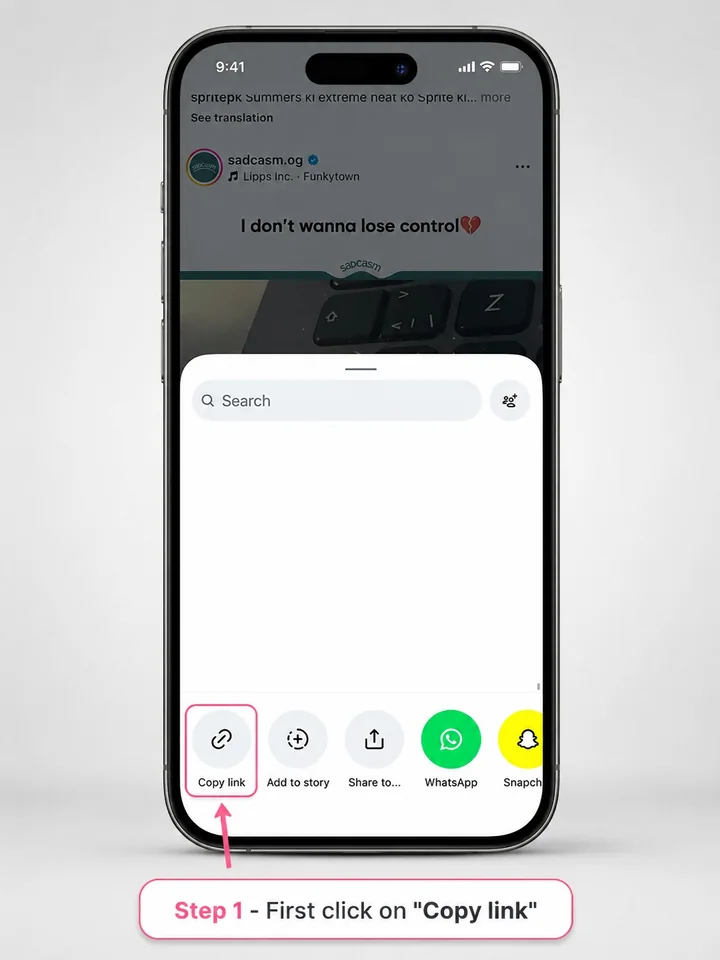
Open the individual public photo post in the Instagram app. Tap Share and choose Copy Link. This is the first step in how to copy Instagram photo links correctly. Avoid copying a profile, feed, hashtag, or Explore URL.
Paste the post URL into GoodFetch
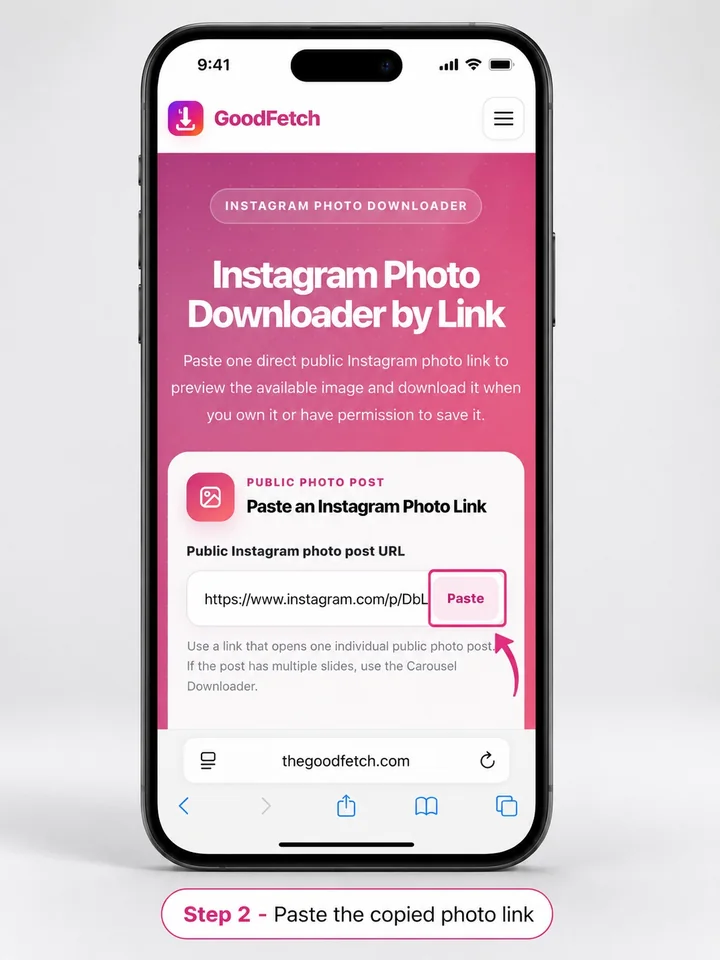
Open the Instagram Photo Downloader in Safari, paste the copied URL, and start the public-source check. GoodFetch returns a result only when the supported source makes an image available.
Review and download the image
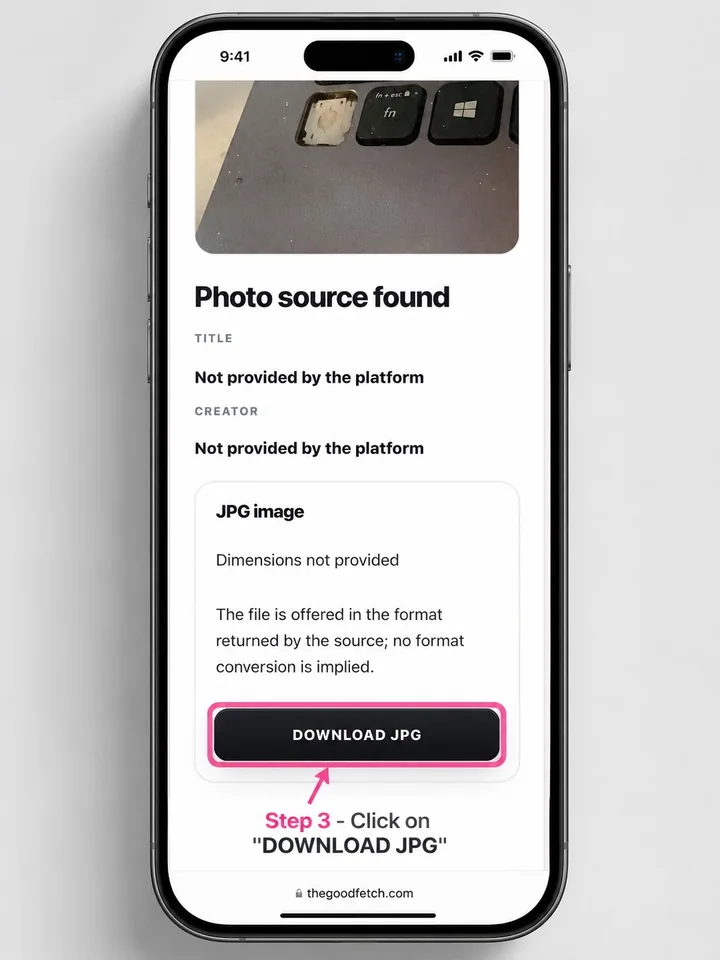
Confirm the preview, file type, and available dimensions, then tap the download action. This is the same basic process used when people search how to download Instagram photos or how to download images from Instagram through a public link.
Where do downloads from Safari go on iPhone?
Safari normally stores downloaded files in the folder selected under Settings - Safari - Downloads. The most common locations are the Downloads folder in iCloud Drive or On My iPhone.
- Open Safari and tap the download indicator when it appears, or open the Files app.
- Choose Browse, then check Downloads under iCloud Drive or On My iPhone.
- Tap the image to preview it.
How to save Instagram photos to Gallery or Camera Roll
On iPhone, searches for how to save Instagram photos to gallery or how to save Instagram photos in gallery usually refer to moving the downloaded image from Files into the Photos app.
- Open the downloaded image in Files.
- Tap the Share icon.
- Choose Save Image when the option is available.
- Open Photos and check Recents.
The same steps answer how to save Instagram posts to Camera Roll and how to save Instagram photos to Camera Roll after a browser download. For users asking how to save Instagram photos to the gallery on an iPhone, the destination is normally the Photos app rather than a folder literally named Gallery.
Why an Instagram photo may not download or save
The copied URL opens a profile or feed
Return to the individual public photo post and copy its Share link again. A profile, feed, Explore, or hashtag page is not a supported single-photo URL.
The post is private, removed, or login-protected
GoodFetch does not authenticate with Instagram or bypass access controls. The post must be available to the configured public source.
The result or download reference expired
Temporary files and short-lived references can expire. Analyze the original public post URL again and use the new result.
Instagram photos not saving to Camera Roll
Check Files - Downloads first. Then open the image and use Share - Save Image. Also confirm that the file is a supported image format, enough storage is available, and the relevant app has permission to add items to Photos.
Can you download Instagram photos in high quality?
GoodFetch provides the image source returned for the public post. If your goal is to download Instagram photos in high quality, review the dimensions shown in the result before saving the file. The original upload, lossless quality, a fixed resolution, and identical compression are not guaranteed.
Privacy and responsible use
GoodFetch processes the submitted public link to prepare the available result and may use temporary files, cached responses, or short-lived references. It is not intended as permanent image storage. Review the Privacy Policy, Copyright Policy, and Terms of Use.
Frequently asked questions
How do I save Instagram photos on iPhone?
Copy one public single-photo post link, process it with GoodFetch, download the returned image, open it in Files, and choose Share - Save Image when iOS provides that option.
Can I download an Instagram photo directly to Photos?
A browser download commonly goes to Safari Downloads or Files first. Open the downloaded image and use the Share menu to move it to Photos.
Why does the photo open in Files instead of Photos?
Files and Photos are separate storage locations. Web downloads normally enter the configured Downloads folder before you manually save the image to Photos.
Can GoodFetch download private Instagram photos?
No. GoodFetch supports publicly accessible photo-post links and does not request a login, private cookie, or access to a private account.
Can I save several Instagram pictures from one post?
Use the Instagram Carousel Downloader when the post contains multiple slides. This guide and the Photo Downloader are for one single-image post.
Does GoodFetch guarantee original image quality?
No. GoodFetch provides the image source returned for the public post. Dimensions and compression can vary, and the original upload is not guaranteed.
Ready to check a public Instagram photo link?
Use the dedicated GoodFetch tool for one supported public single-image post.