
Download Instagram Carousel by Link
A public carousel post link should open one individual multi-item Instagram post. It can contain several photos, several videos, or both. GoodFetch checks one supported link per request and shows only the items returned by the configured public source.
Profile, feed, hashtag, Explore, private-account, and login-protected links do not fit this workflow. Public visibility also does not remove copyright, privacy, publicity, or platform restrictions.
How to Download Multiple Photos from Instagram
For an Instagram multiple photos download, use the carousel tool rather than the single-photo tool. A carousel result is a collection of separate photo and video downloads, not one combined archive. This distinction keeps each returned item clear and avoids suggesting unsupported bulk-profile or ZIP functionality.
- Use the direct URL for one public multi-item post.
- Confirm that the post contains more than one slide.
- For one image with no additional slides, use the Instagram Photo Downloader.
- Save only media you created, are licensed to use, or have permission to download.
How to Download Instagram Carousel Photos and Videos
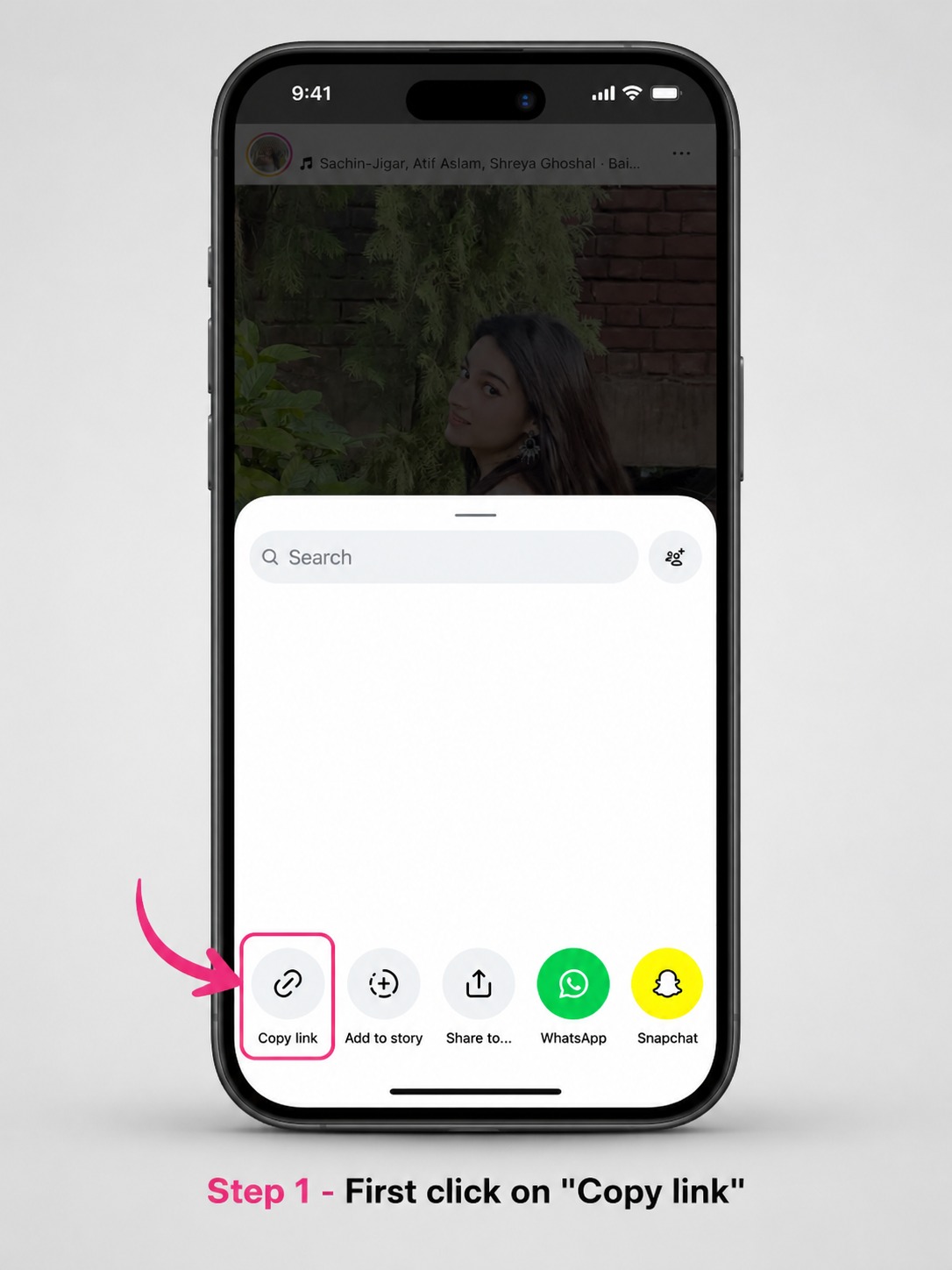
Copy the public carousel post link
Open the individual multi-item post in Instagram. Use the Share control and choose Copy Link. Confirm that the copied URL opens the exact post rather than a profile or feed.
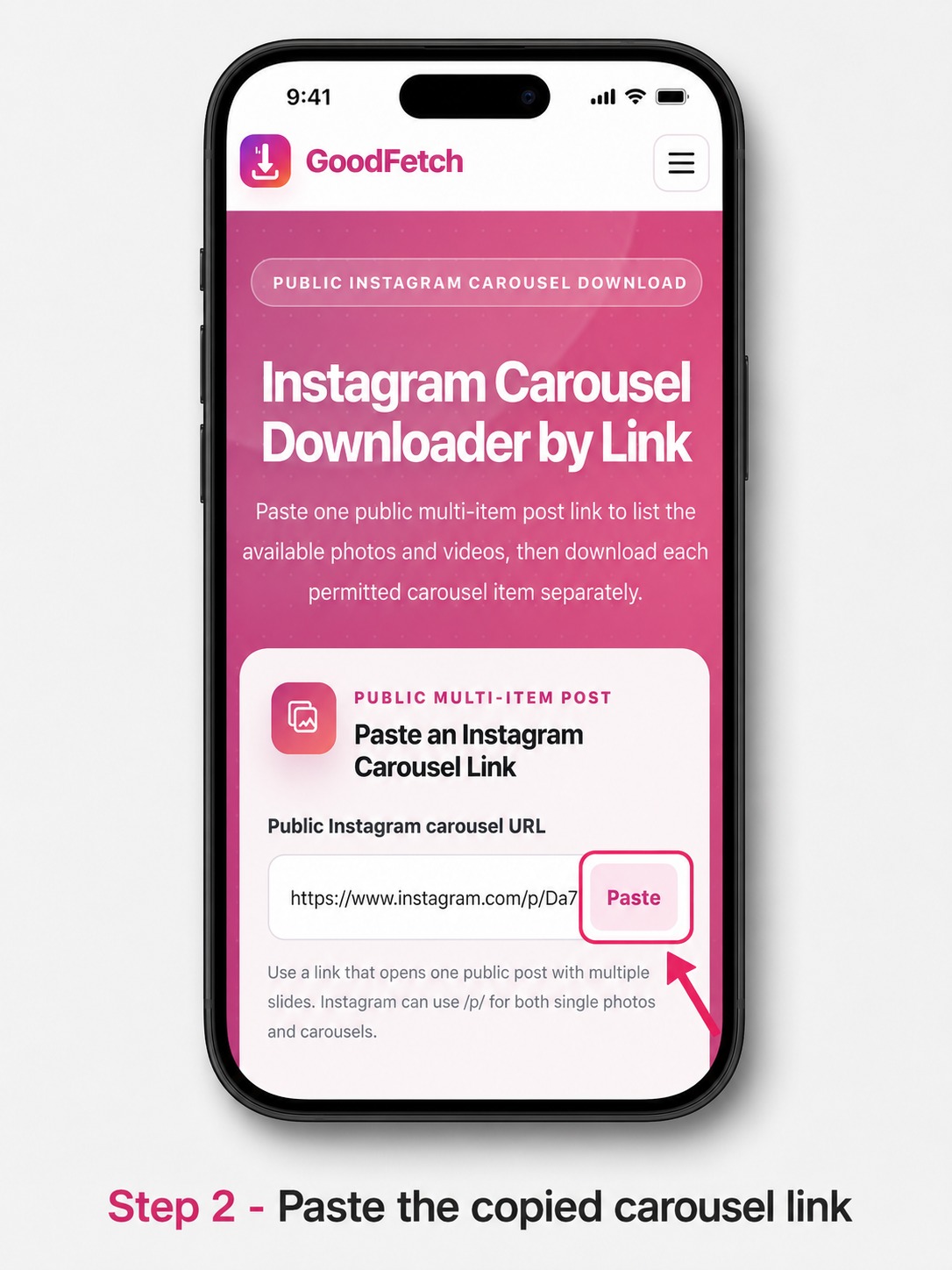
Paste and analyze the carousel URL
Open the Instagram Carousel Downloader, paste the public post link, and start the source check. GoodFetch displays a result only when the configured provider returns available items.
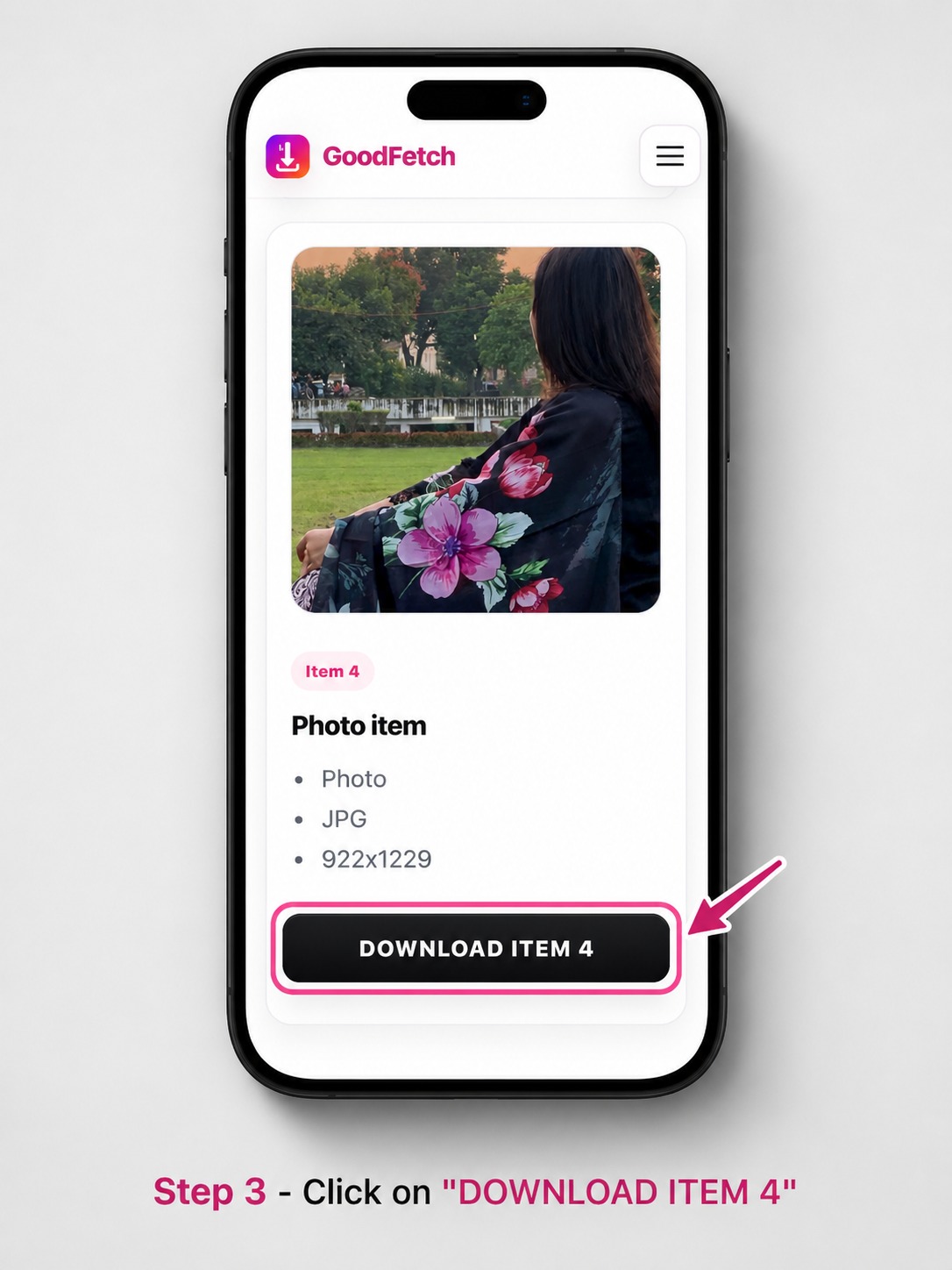
Review and download each returned item
Check the numbered photo and video cards. Use the individual download control for every permitted item you want to save. The displayed sequence follows the provider response and can omit unavailable slides.
How to Understand the Carousel Result
GoodFetch numbers the returned media so you can review the post one item at a time. A result may contain images, videos, or a mixture. Format, dimensions, duration, preview, and source details appear only when the provider returns them.
If the result contains fewer items than the Instagram post, one or more slides may be removed, restricted, unsupported, temporarily unavailable, or omitted by the source. GoodFetch does not create substitute media for missing items.
Where Carousel Downloads Are Saved
How to Download Instagram Carousel on iPhone
Safari normally saves each item in Downloads. Open the Files app, tap Browse, and check Downloads under iCloud Drive or On My iPhone. To place a supported image or video in Photos, open the downloaded file, tap Share, and choose the available save action.
Save Instagram Carousel to Gallery on Android
Check the browser Downloads list, the Downloads folder, or the device's Files app. Supported media can appear in Gallery after Android indexes the downloaded file. Move it with a file manager only when necessary.
Windows PC and Mac
Open the browser Downloads panel or the folder selected in browser settings. Each carousel photo or video is saved as a separate file.
Instagram Carousel Download Troubleshooting
Why Instagram Carousel Download Missing Photos Can Happen
The public source may not return every visible slide. Removed items, unsupported formats, account restrictions, temporary provider failures, or region and login limits can reduce the returned count.
The link opens a profile, feed, or single photo
Return to the individual multi-item post and copy its Share link again. Use the Photo Downloader when the post contains only one image.
The temporary result expired
Analyze the original public carousel URL again and use the new item-specific download controls.
Carousel Photo and Video Quality
Can You Download Instagram Carousel High Quality?
GoodFetch provides the media source returned for each public item. Photos and videos can have different formats, dimensions, resolutions, durations, and compression. Original-upload quality, lossless files, and a fixed HD resolution are not guaranteed.
Privacy and Responsible Use
GoodFetch processes the public URL to prepare the available result and may use temporary files, cached responses, or short-lived references. It does not request an Instagram password or private-account access. Review the Privacy Policy, Copyright Policy, and Terms of Use.
Frequently Asked Questions
What is an Instagram carousel post?
An Instagram carousel is one post containing multiple swipeable photos, videos, or a mixture of both. GoodFetch shows each available returned item separately.
Can I download every carousel item at once?
The current GoodFetch workflow does not create a ZIP file or provide a functional Download All action. Download each available photo or video separately.
Why Instagram carousel download missing photos can happen?
The public source may omit an item that is removed, restricted, unsupported, temporarily unavailable, or not returned by the provider. GoodFetch does not create replacement slides.
Can GoodFetch download a private Instagram carousel?
No. GoodFetch supports publicly accessible post links and does not request an Instagram login, private cookie, or access to a private account.
Where are Instagram carousel downloads saved?
Your browser normally saves each item in its configured Downloads location. On iPhone, check Safari Downloads or Files. On Android, check Downloads or Files. On computers, check the browser Downloads folder.
Can you download Instagram carousel high quality files?
The returned photo or video may have useful quality, but GoodFetch does not guarantee the original upload, a fixed HD resolution, lossless media, or the same quality for every item.
How do I download multiple photos from Instagram?
Use the direct link for one public multi-item post, analyze it with the Instagram Carousel Downloader, and download each available returned photo or video separately.
Can I save all photos from an Instagram carousel?
You can save the photo items that the public source returns and that you are permitted to download. The number of returned items can be lower than the visible slide count.
Ready to Check a Public Carousel Link?
Use the dedicated GoodFetch Instagram Carousel Downloader for one supported multi-item post.